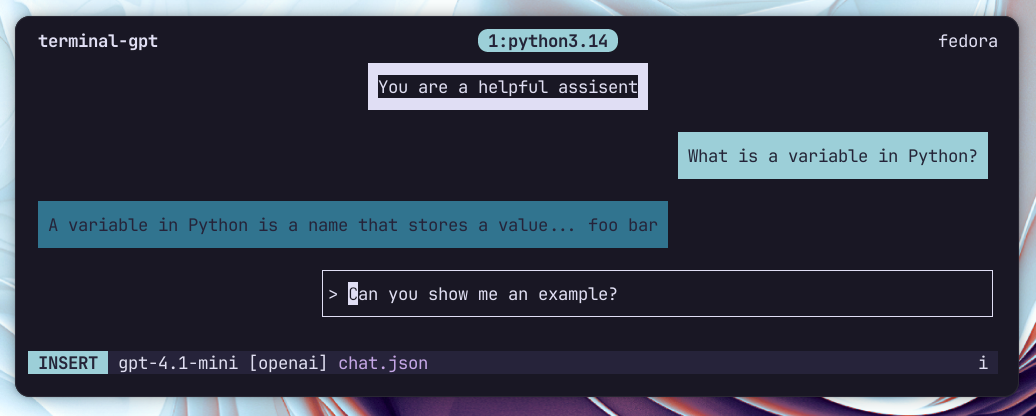
Terminal GPT
From my usage of ChatGPT while working in the terminal I noticed a couple of things.
Normally I have a simple question, need to copy part of the output, and go back to the terminal. For a keyboard-focused workflow, switching to the browser every few minutes gets tedious. So I set out to build something you can use without leaving the shell.
Why I built it
I like to edit the conversation history. If the model makes a small mistake in an earlier reply, I want to correct that message so follow-ups don’t keep repeating the same error. I also live in Vim, so I tried to port as many Vim-like keybindings into the app as possible.
That’s why I created Terminal GPT: a terminal TUI that makes it fast and easy to edit, delete, or add messages in the conversation history. From my experience with language models, keeping the context clean is huge. Terminal GPT lets me ask a quick question about a project and, if the response isn’t relevant, delete it and retry. No browser required.
What it does
- Vim-like interface and modes inspired by Vim (Normal, Insert, Visual).
- Real-time streaming: watch model responses stream as they’re generated.
- Message editing: edit any message inline with Vim motions or open it in your external editor.
- Model selection on the fly.
- Save/load chats as JSON and render them back to the terminal.
- Configurable providers and models via a TOML file.
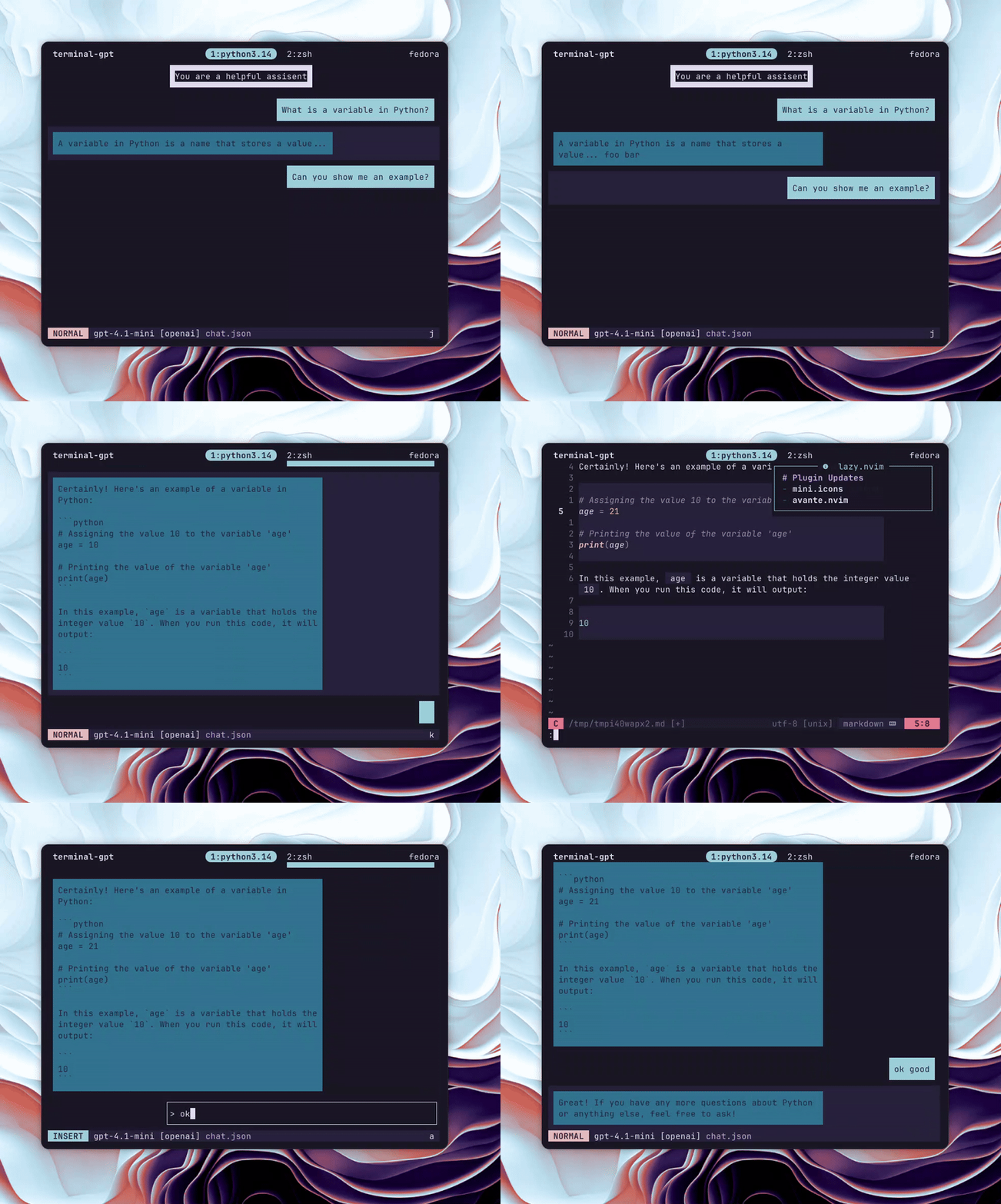
My favourite feature
Being able to open any response in Vim, select the relevant passages with all my custom keybinds and syntax highlighting, then close the chat and paste the answer into my project, all without leaving the terminal.
Pressing the external editor hotkey opens the current message in your $EDITOR — edit, save, quit, and the chat updates. It is the thing I miss most everytime I have to write / edit text in the browser.
Quick demo
Start a chat with the default model:
terminal_gpt
Start with a specific model:
terminal_gpt --model gpt-4.1-mini
Render a chat file to the terminal:
render_chat ~/chats/my_chat.json
render_chat ~/chats/my_chat.json 120  # specify width
This was basically build to browse chat files using fzf --preview=render_chat.
Keybindings
Normal mode (default)
i,a— enter insert mode at cursorj,k— move between messagesdd— delete current messageCtrl+e— edit message in external editorCtrl+p— model selection popupEnter— send message / get responsegg,G– go up / down the entire page
Visual mode
j/kto select,dto delete selection,h/lto switch roles
Insert mode is just typing — Esc to go back to Normal.
Under the hood
The app is built with urwid for the terminal UI and uses litellm as a provider abstraction layer. Currently I have an OpenAI backend wired up, but the design lets you add other providers easily via a models/ implementation.
Key custom pieces:
ChatHistoryandEditableChatBubblewidgetsVimKeyHandlerparsing modes and motionsVimHeaderstatus bar showing mode, model, and key sequences
I rely on libraries like urwid and litellm; both made building a terminal chat far less painful.
Install & config
Clone and install from source:
git clone https://github.com/yourusername/terminal-gpt.git
cd terminal-gpt
pip install -e .
Create ~/.config/terminal_gpt/config.toml to define your default model and providers (you can use api_key_cmd to fetch keys from a password manager).
Final thoughts
Terminal GPT is small and opinionated: it assumes you prefer keyboard control, short feedback loops, and keeping context tidy. It’s not trying to replace the full browser experience — it’s for the times you just want a quick, terminal-native chat, edit it like code, and paste the useful bits into whatever you’re building.
If you like the idea, check the repo README for the demo and full keybinding list. I’d love to see how people adapt the workflow — branching chats, experimental prompts, or maybe building richer integrations with editors and tooling.
Got feedback or want a feature? Open an issue or a PR — contributions are welcome.